Naut
A downloadable tool for Windows, macOS, and Linux
Naut is simple-but-powerful desktop calculator.
Instead of working like a standard calculator (or one with a history), it is a live-coding environment in disguise, optimized for quick number crunching and visual function exploration.
Perfect for when your OS calculator just isn't cutting it, but Mathematica et al are overkill.
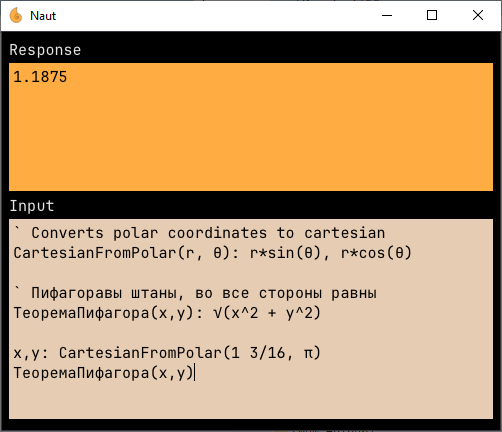
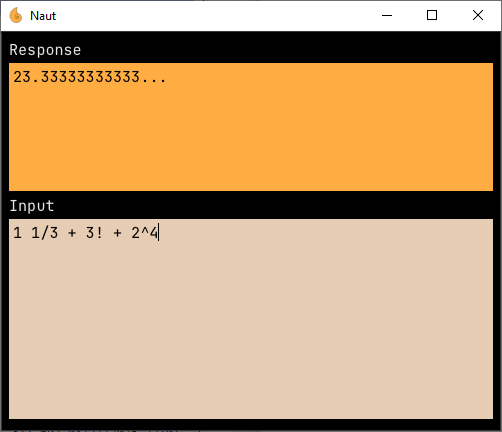
* Use natural expression syntax including exponentiation, factorial, modulus and common constants
* Built in trig functions but also common programming functions like floor().
* Define variables and functions to organize your calculation.
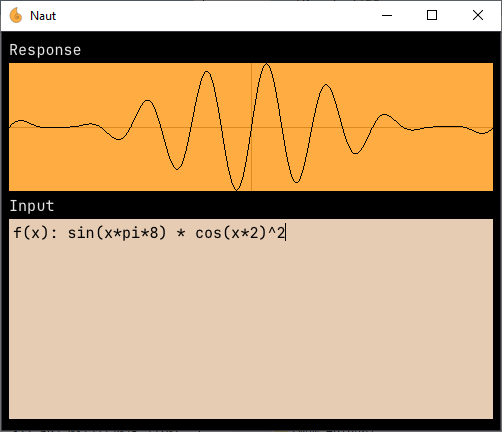
* Plot and play with functions instantaneously.
* Unicode support for Greek and Cyrillic letters and names.
* Single, small, self contained executable.
Bugs? Comments? Ideas? Hit up the discord server 🙏
Download
Comments
Log in with itch.io to leave a comment.
Nice tool!
I do not know if it has been requested already, but it would be great to enable multiple functions in graph mode to make comparing them easier and visually immediate. Perhaps they could also be faded except for the one the cursor hovers? Or perhaps this all could be explicitly controlled from the language itself, a bit like watch expressions in a debugger, at which point custom colours could also be a thing?
Anyway, thanks for your work!
You can already plot multiple functions actually, by listing them with commas, like so :)
f(x): x^2
g(x): sin(x)
f,g
Naut will "print" whatever it sees on the last line. If you give it a function (or a list), it will plot it (or them), and if you give it multiple numbers, it will print them.
It's a good idea to hover and highlight though! Custom colors could also be a thing, just need to add the idea of saving them to a user file somewhere (right now Naut doesn't load/save any data, it's self contained, but it wouldn't be a problem for "user customization" to live in some other folder I think)
Oh I didn't know you could list values! Nice!
For the colours I was thinking about plotting specifically (although I guess customising UI colours could be nice too), where you would specify a colour attribute per line, before (or after?) an expression to evaluate.
I'm trying to avoid too much "styling control" in the code itself, since it's not really designed as a "picture maker" and I don't want to burden the language syntax, but I've considered stuff like @color(255,128,64) and things of that nature as optional "style comments". I think the primary colorizing would come from a global "settings" menu though, so I'd just allow setting the entire app's color scheme (including the colors for each plotted graph, up to 16 or something). It's not that I don't want it to be used for making pictures, it's just that it's a deep rabbit hole of scope, so I need some kind of self imposed guardrails :P So at the moment it's something like "customizing colors to your liking makes sense, but customizing colors and styles for a perfect diagram to use elsewhere" probably doesn't make sense.
I see, fair enough : ) The up-to-16-plots idea is indeed simpler.
Thanks, it is actually handy this., but what would be good (for my usecase ;) so feel free to ignore) is that it would track the active equation/formula based on cursor
So if you have
3+5
4+7
in the input now it will always show 11, but what if you put your cursor on 3+5 it would show 8?
Another option but maybe more cumbersome would be to have different input tabs.
Really cool tool already, wonder what you will add in future releases.
That's an interesting idea!
Another option others have suggested is "ghost" results written next to each line, which shows "what would be printed if this was the last line" (which is a little bit different from "what would this line in isolation print", since that doesn't take into account prior line's definitions etc)
Yeah that ghost thing would also fix "my" usecase of just doing random math equations that are not related to each other at all, which I now just put at the bottom and shuffle around when needed.
In some other editors they work with execute what is selected. This way you can select multiple lines if you need predecessor evaluations
Good to know, thanks!
I 2nd this, it would be awesome with a 'ghost' result next to each line :) Great tool nonetheless, already using it a bunch. Thanks!
Cool and handy tool to make my life easier
Glad to hear it :)